



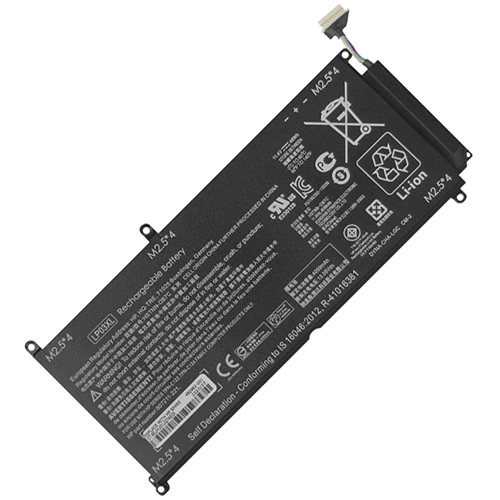
Replacement Battery for HP ENVY 15-AE134TX 48Wh 11.4V
- $ 89.85 $116.81
- Free and fast shipping + 1 year warranty + 30 day money back!
-
Availability : In stock
Battery Type : Li-ion
Voltage : 11.4V
Capacity : 48Wh
Color : Black


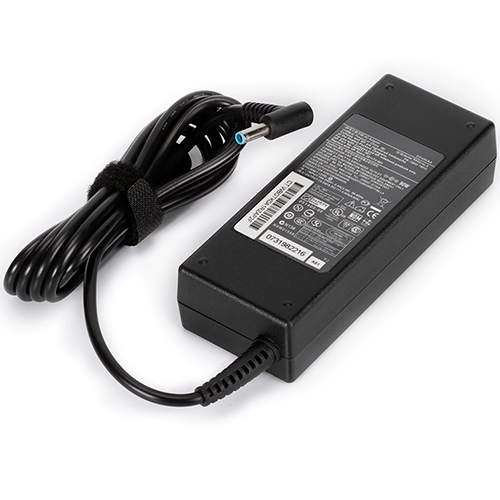
AC Power Adapter for HP ENVY 15-AE134TX
- $35.56 $45.89
- High Quality replacement HP ENVY 15-AE134TX adapter Includes AC Power Cord , Input Voltage 100-240VAC 50/60Hz , Over Voltage Protection, Short Circuit Protection, Over Current Protection
-
Availability : In stock
Description
| HP ENVY 15-AE134TX battery specifications | |
| Availability: | In stock |
| Battery Type: | Li-ion |
| Capacity: | 48Wh |
| Voltage: | 11.4V |
| Useful Life: | 300-500 recharges |
| The condition of the product: | Band New |
| Warranty: | 12 Months |
We provide high-quality ENVY 15-AE134TX laptop battery that are compatible with your products . Thw Battery for ENVY 15-AE134TX is quality tested and checked before dispatch
We offer superb pre-sales and after-sales service, providing 12 months warranty options to our customers. our hp ENVY 15-AE134TX laptop battery have gone through vigorous testing to ensure stability and safety. When it comes to protection then our batteries are equipped with over-charge protection, over-discharge protection, over current protection, and short circuit protection.
Our main motive is to deliver high-quality batteries for ENVY 15-AE134TX laptop battery at your doorstep and for any further assistance, you can call our customer E-mail service@hp-battery.com for Purchase information or any other queries related product.
Follow the notice below, Better using your Hp ENVY 15-AE134TX Laptop Battery
- Storage - Store your HP ENVY 15-AE134TX Laptop Battery in a clean, dry, cool place away from heat and metal objects. The Hp ENVY 15-AE134TX batteries will self-discharge during storage; remember stored at about 40% state-of-charge.
- Charge and discharge - For lithium ion batteries, you do not need to discharge them fully and recharge constantly. You need to do a full discharge only about every 30 charges. Do not charged to higher voltages than its threshold voltage
- Exercise Your ENVY 15-AE134TX Battery - Do not leave your batteries dormant for long periods of time. We recommend using the battery at least once every two to three weeks. If a battery has not been used for a long period of time, perform the new battery break in procedure described above.
- Calibrate Your batteries - If your Battery's 76% even less in work , you must fully charge, fully discharge, and then fully recharge the Laptop Battery pack.
- Consider removing the HP ENVY 15-AE134TX battery from a laptop when running on fixed power
- Do not short-circuit. A short-circuit may cause severe damage to the battery.
- Avoid propping your laptop on a pillow, blanket, or other soft surface that can heat up. Your HP ENVY 15-AE134TX battery is a lot less efficient when not within its standard operating temperature range.
Fit Machine Models:
- ENVY 15-AE134TX
Compatible with numbers:
- 804072-241
- 804072-541
- 805094-005
- 807211-121
- 807211-221
- 807211-241
- 807417-005
- B01NANGLWL
- B07CHWWSNG
- BWRLP03XL
- HSTNN-DB6X
- HSTNN-DB7C
- HSTNN-UB6R
- LP03XL
- LP03048XL
- LP03055XL
- LP03055XL-PR
- TPN-C121
- TPN-C122
- TPN-C124